

Roadmaps & Release Notes
March 13, 2026
Ally 2.17.5 Release Notes

# Ally
# Accessibility
March 12, 2026 Release to Production

Ally 2.17.5 | Release to production: March 12, 2026
Blackboard “UNSAFE_HTML” Files No Longer Included in Reports
As part of our ongoing commitment to instructor efficiency and clarity in reporting, the Ally reports will no longer consider UNSAFE_HTML files as part of the course content for Blackboard integrations.
Image 1: Course Report with UNSAFE_HTML included to show past behavior.
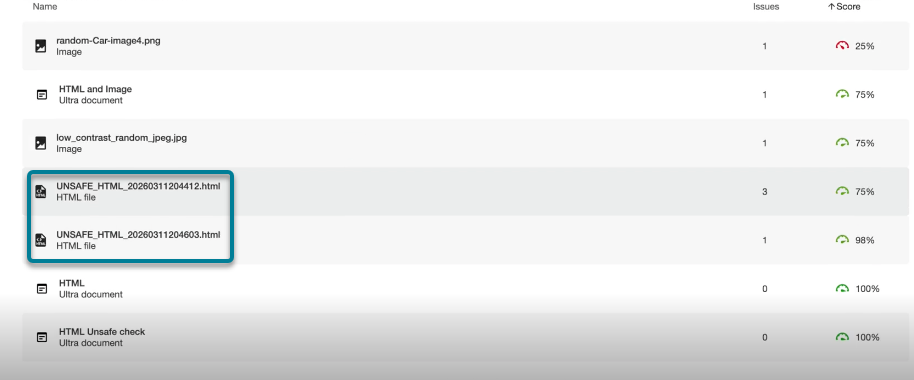
As of this release, UNSAFE_HTML files automatically created in the content folder when using HTML snippets inside a Blackboard Document will be filtered out of the Institutional and Course reports. Previously, these files would show in the report but instructors were not able to fix the identified issues for missing language and title and often turned to other workarounds to remove these files from the course to remove them from the reports.
Note: This change will remove all current and past UNSAFE_HTML files from consideration. Depending on how often these content items were used in a course, this may result in a slight increase or decrease in the course score based on the distribution of files, HTML and WYSIWYG content.
As part of a future release, we will look to avoid processing these files entirely when onboarding a course to help improve general performance and scanning.
Bug Fixes and Improvements
- Fixed an issue in Blackboard integrations that caused a discrepancy with scoring for images when comparing the score within the Instructor Feedback of a Document to the score in the Course Accessibility Report when images were set to View Only or Download Only. The Course Accessibility Report was incorrectly missing previously applied alternative text and lowering the score despite this showing as fixed in the Instructor Feedback. Note this applies to images in Ultra Documents as part of the course and the Learning Object Repository.
- Fixed an issue in the PDF Missing Language Quick Fix that allowed the “Apply” button to be clickable before the instructor selected a language.
- Improved the styling on the Library Reference links in the Alternative Formats download window so that reference links show as clickable links and avoid potential contrast issues.
As a reminder, Release Notes are available on our help site: https://help.anthology.com/ally-lms/en/administrators/whats-new/2026-release-notes.html
Comments (0)
Popular

Popular
Dive in