

Inside Blackboard
July 31, 2026
Doubling Down on Usability: Major Enhancements in the Blackboard LMS Roadmap
# Blackboard LMS
# Roadmaps
7 minute read
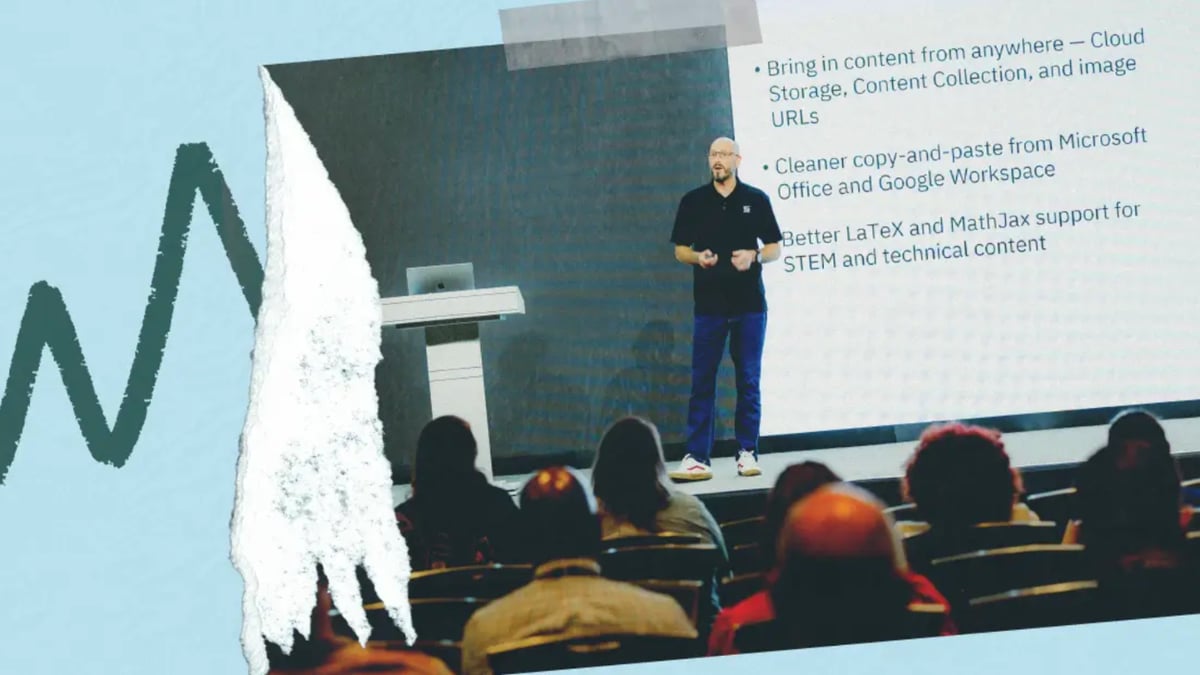
Nathan Cobb and Fredrik Klemming were greeted by rapturous applause when they took to the stage at Building Blackboard Together to present the Blackboard LMS roadmap. Admittedly, much of the noise was coming from the bar next door showing the World Cup semi-final, but those who packed into the room were also full-throated in their support.
Relentless dedication to the user experience underpins our plans for Blackboard LMS. As observed by Matt Winn from The Tambellini Group , the platform is evolving to “address the daily frustrations that shape how faculty experience an LMS . The audience response (at Building Blackboard Together) reinforced that customers value visible evidence that their feedback is being heard and incorporated into the product.”
Voted by you: The Community’s favorite upcoming innovations
After Nathan and Fredrik had unveiled the latest capabilities, Juliana Castelblanco, manager of our thriving Blackboard Community , checked in with the audience to see which updates have them most excited. As captured in our Roadmap Recap video, there are five features that users simply can’t wait to get their hands on.
- New Content Editor (staggered release from September): This will immediately streamline the editing experience in Blackboard, with reorganized menus, improved formatting, and built-in accessibility. Later in the year we’ll be evolving further, to make it easier to bring in content from cloud storage and better support LaTeX and MathJax for STEM and technical content.
- Student To-Do List (August release!): Back to the World Cup for a second: what do data and Shakira’s hips have in common? They don’t lie. And our ongoing usability data in Blackboard LMS reveals clearly that students are looking for more guidance on upcoming tasks. The new Student To-Do List addresses this directly, displaying everything that’s due in one location.
- AVA: Scalable Formative Feedback (Next: 3-6 months): Sometimes described as the “needle in the assessment haystack” , institutions will soon be able to deliver detailed, formative feedback at scale. Students can check their work against the grading rubric ahead of submission, rewarding proactivity and empowering them to improve their final submission. Instructors maintain visibility over the full process.
- New Gradebook Grid View (August release!): A year of listening has informed a completely revamped gradebook in Blackboard LMS. The improvements are simply too vast for us to effectively summarize here: check out the Gradebook Grid Resource Hub on the Community for full details and instructional videos.
- AI Flashcards (Now: 1-3 months): Instructors were delighted to learn that they’ll soon be able to use AI to generate flashcards based on the course material. This is a great way to identify knowledge gaps for learners, and many faculty reported how useful it will be for tasks like exam preparation. Like so much AI innovation in Blackboard, this will be available to all institutions as part of the core license - watch the recording of the Product Keynote to see a live demo of AI Flashcards in action.
Other Gems from the Blackboard Idea Exchange
Our team continues to dive into the deep trove of inspiration that is the Blackboard Idea Exchange , with tons more user-requested capabilities to land in production environments over the coming months.
- Rubric Enhancements: We’ll soon be launching a Rubrics Management Page for instructors, where they can see all the rubrics for the course in one place. This amassed an incredible 790 votes on the Idea Exchange! Similarly popular is the option to use multiple rubrics for a common assessment, which will be available towards the end of the year.
- Faster, Easier Group Setup: Much like the new Content Editor, this is one that will feature iterative improvements over time. In the short term, instructors will be able to easily create multiple groups at a time, drag and drop students into groups, and leverage new search functionality to easily locate students and groups. Other major improvements, like making accommodations visible within group setup workflows, are also in the works.
- Duplicate Items and Folders: Another Idea Exchange favorite is the possibility to duplicate content, making it simple for instructors to reuse what works. Got a structure that worked well in week one and want to replicate it in week two? No problem – the duplicate feature, coming in the next couple of months, will make this happen with just the click of a button.
This is just a preview
There are literally dozens of new capabilities on the way to Blackboard LMS, and this humble blog couldn’t possibly stretch to cover them all. In fact, even those of you who were able to join us in Dallas saw only a snapshot of what’s coming – there are lots more exciting updates that we couldn’t squeeze into the forty-minute live session.
That’s where our roadmap webinars come in. Join us in the first week of August as we undertake a true tour de force of learning technology , taking you through everything you can expect to land in the platform over the coming months. There are a range of options to suit your preferred time zone.
Please note: All release details and dates are subject to change. Please review monthly release notes for the latest updates.
FAQ
What is the Blackboard LMS roadmap?
The Blackboard LMS roadmap details all the new capabilities that are coming to the platform, along with indicative timeframes on their release (noting that these are subject to change). We present these updates in a quarterly webinar – click here to register for the August series .
What new AI features are coming to Blackboard LMS?
Blackboard LMS leads the market for AI innovation. Our existing capabilities have powered more than 10 million learning tasks around the world.
In the latest roadmap, we announced four new AI features:
- AVA: Formative Feedback – this allows students to check their work against the grading rubric prior to submission.
- AVA: Virtual Assistant – provides immediate responses to common student inquiries based on the course context.
- AVA: Pulse Quiz for the AI Conversation – a new activity within the popular AI Conversation tool, great for recapping knowledge and exam preparation.
- AI Flashcards (core Blackboard LMS) – An interactive flashcard activity that can be used to identify and address gaps in student knowledge.
What is the new AI Flashcards activity in Blackboard?
The new AI Flashcards activity helps identify and address gaps in student knowledge in a fun and interactive way. Blackboard LMS will suggest flashcards for the instructor, which they can review, edit, and ultimately approve before they’re made available for students. Leading institutions report that this capability will be valuable for self-assessment and exam preparation.
How does Blackboard support formative assessment?
The addition of AVA: Formative Feedback is a huge development, allowing Blackboard LMS to further support formative assessment. Students can check their work against the grading rubric prior to submission, promoting skills of self-assessment and allowing them to strengthen the final output. This suggestion came directly from our Future of Assessment Working Group.
What improvements are coming to the Blackboard Gradebook?
The new Gradebook Grid View has been designed in collaboration with instructors, and provides all their grading needs in one intuitive workflow. Check out this blog for full details .
How does Blackboard collect product feedback from educators?
User experience is fundamental to our approach, and we collect feedback in several ways. As detailed in this interview with our VP of Design, Jo Packer , the development of Blackboard LMS is designed based on client feedback as well as our analysis of the user experience. Institutions can provide feedback via the Blackboard Idea Exchange, Focus Groups, Office Hours sessions and more – learn more about the scale of involvement from our Community .
What is the Blackboard Idea Exchange?
The Blackboard Idea Exchange is an online forum where all Blackboard LMS users can submit ideas for the platform and vote for the submissions of others. These ideas are then considered by the Blackboard Product team, and we call out the Community contribution when presenting these features in our quarterly roadmap. We release hundreds of user-requested features every year.
When will the new Blackboard LMS features be released?
Blackboard LMS has a monthly release schedule, with new innovations going into production environments in every release. Review our Help Site for full release notes and information.
Like
Comments (0)
Popular

Dive in
Related
Blog
New in 2025: Adding Open Badge capabilities to the Blackboard Catalog
By Ben Burrett • Jan 14th, 2025 • Views 168
Blog
Advancing Adult Learning in the Digital Age: Introducing Blackboard Professional Development
By Chris O'Neal • Jul 8th, 2025 • Views 368
Blog
Advancing Adult Learning in the Digital Age: Introducing Blackboard Professional Development
By Chris O'Neal • Jul 8th, 2025 • Views 368
Blog
New in 2025: Adding Open Badge capabilities to the Blackboard Catalog
By Ben Burrett • Jan 14th, 2025 • Views 168